
The interface is a local page served by the app. It has English and Chinese strings. Nothing is sent to a project-hosted account. There is no login screen because the server is on localhost.
Pages
The sidebar has four destinations:
- Overview — the current tasks, a status line, and filters.
- Memory — preferences, rules, and experience you saved. You can edit, delete, or restore them.
- Connections — each source, its access, observation, search, work artifacts, and MCP.
- Settings — appearance, Your standing agreements, and Notifications & learning: quiet hours and how often the app may ask. Agreements and appearance do not grant a connector write. The rules are on Automatic follow-up.
Task filters are All, To review, In progress, Waiting for input, and Finished. There is also a task search. New tasks and live updates do not open details or take keyboard focus. The keys are on Keyboard shortcuts. The ? button in the header opens the same list.
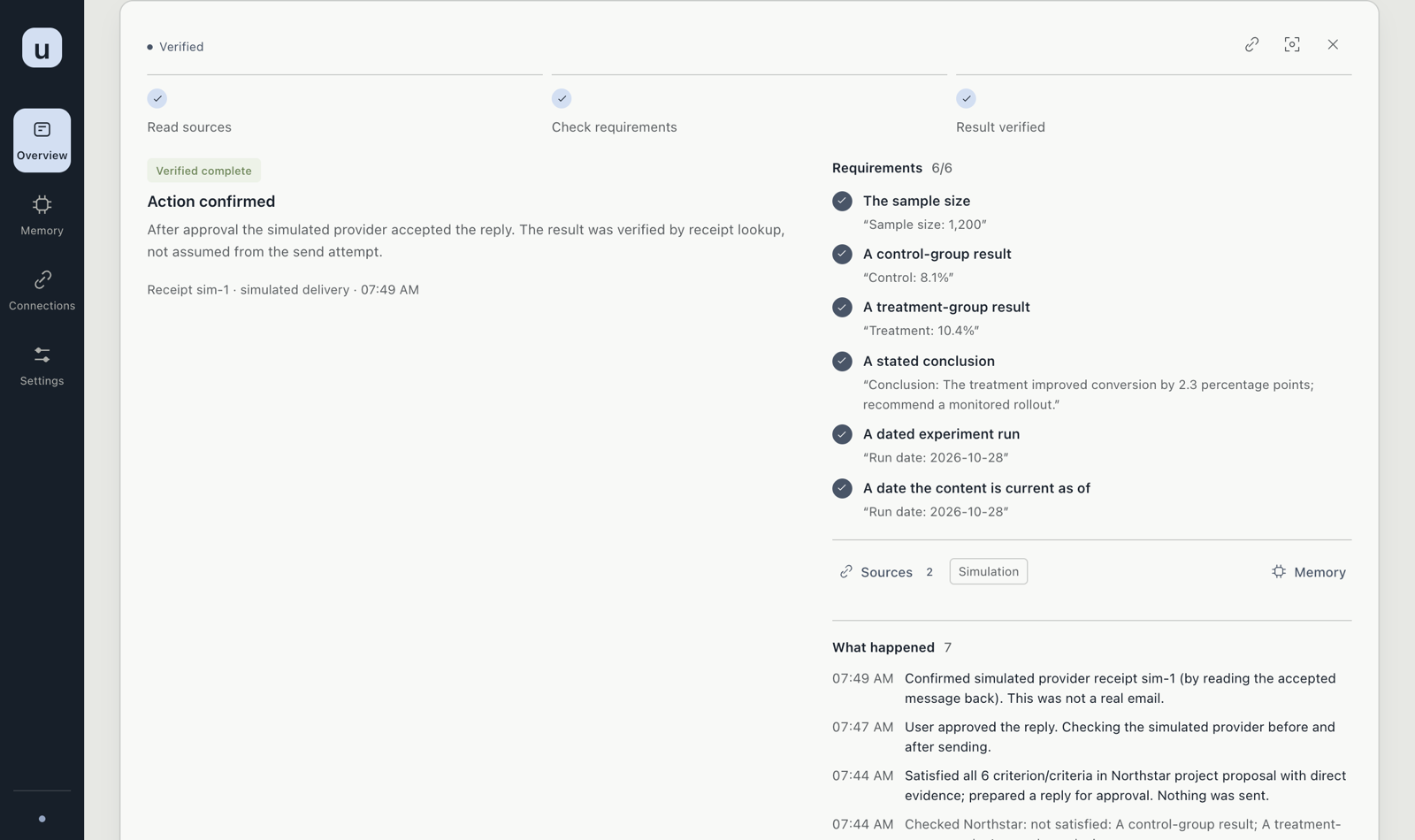
A task
Open a task in place. The outcome is shown first. An unverified result is not shown as done. Each requirement sits next to the evidence that satisfied it, with that task's history.
A prepared reply or document carries a review token. Approving sends that token. If the source changed, approval is refused and the task has to be reviewed again. After a permitted send or edit, the app reads the result back. Only that readback is treated as verified.
You can edit or delete memories. Disconnecting a source stops new reads and keeps the saved local copy until you clear it. See Permissions and privacy.
Appearance
Settings can follow the system theme, or stay light or dark. Interface style is Space (the default), Classic, or Compact. Color palette is Mist (the default), Sage, Sand, Graphite, or five custom colors. Text and buttons adjust for contrast. Restore defaults returns the original style. The choice is saved in this browser. It does not change what the app can read or write.
Was this useful?
An open task asks Was this follow-up useful? The answers are Useful and Not useful, with an optional reason. Correct future discoveries can mark it Not mine, Duplicate, Already handled, or Wrong document link. A duplicate needs a related task. A wrong document link needs a document on that task. The correction only changes matching scope, and it can be undone on the same task. The label stays in the local workspace. It is not an automatic score, and it does not send anything.
What you will not find
There is no hosted multi-user workspace, no calendar connector, and no general desktop control. Those are not implemented. The macOS app builder produces an unsigned local bundle. It is not a notarized download.